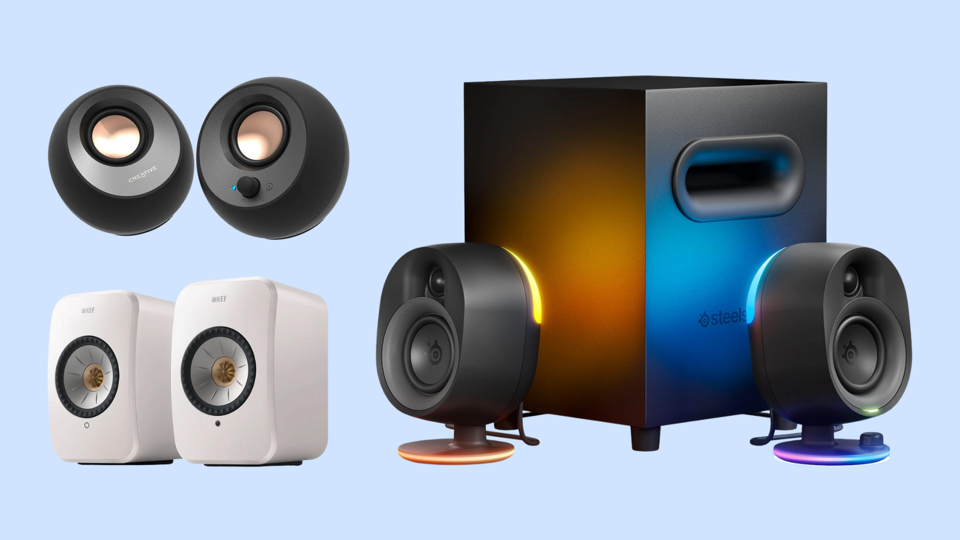
When you’re setting up your computer system, a computer speaker can offer a balanced, rich audio quality that helps immerse you in your music, games and more. After researching, speaking with computer hardware experts and reviewing our team’s testing insights, I chose the Logitech G560 PC Gaming Speaker System as the best computer speakers overall thanks to their crisp and powerful output, rich bass and a handsome design.
The best computer speakers greatly enhance your experience of gaming, music, movies and more.
Forbes / Photo: Retailers
One of the other computer speaker selections featured here may be your best choice based on value, special features or the simple logistics of size or connection requirements. If you want a pair of computer speakers the punch well above their weight, the Creative Pebble V3 2.0 Desktop Speakers are a great option that keeps the cost under $100. Here are the best computer speakers you can add to your desktop, as well as what you should think about when considering speakers for a computer in general.
Maximum power output (peak wattage): 240 watts | Frequency range: 40 to18,000 Hz | Connectivity: USB, 3.5mm AUX, Bluetooth | Control features: Volume | Speaker configuration: Two speakers, subwoofer
Pros:
Impressive frequency range
Stylish design and integrated lighting
Virtual surround sound experience
Cons:
Not fully compatible with Macs
Reports of speakers disconnecting
The Logitech G560 PC Gaming Speaker System has a frequency range from 4o to 18,000 Hz, which means that these speakers can reproduce sounds at just about the entirety of human hearing capacity. They can do so at impressive volume levels, too: these speakers play volume at up to 97 dB. They only offer Bluetooth 4.1, which means it’s a slower connection that can’t reach as far as the current Bluetooth 5.3 standard. The speakers can switch between up to four devices using Logitech Easy-Switch software.
When properly positioned, the two speakers and subwoofer create a virtual surround sound experience that makes games, movies and shows sound more immersive. Built-in lighting adds to the overall effect, though note that customized lighting and some sound tweaking features only work properly with PCs, not Macs. The speakers easily connect to any computer via wire or Bluetooth, though, and they can be paired with consoles and other devices as well. That said, there are reports that the speakers disconnect from users, which may be offputting for some.
No need to bookmark—get it straight to your inbox.
We've sent this story to your inbox.
Best Value Computer Speakers
Plug-And-Play Ready
Amazon
Creative Pebble V3 2.0 Desktop Speakers
Maximum power output (peak wattage): 16 watts | Frequency range: 100 to17,000 Hz | Connectivity: USB-C, Bluetooth | Control features: Volume | Speaker configuration: Two speakers
Pros:
Affordable price point
Plug-and-play for power and connectivity
Cons:
Top volume could be louder
Bass could be stronger
If you’re operating on a smaller budget or you’re seeking speakers for a smaller space, the Creative Pebble V3 2.0 Desktop Speakers are a smart choice. Touro Graduate School of Technology Professor Jeremy Rambarran says the speakers, “generate clear audio, and they’re ideal for compact desks, dormitories or workspaces where space and minimalism are key.” These are also great little speakers for people because they’re a plug-and-play set. Simply connect them to your computer via USB-C cable for both audio connectivity and power delivery. When they’re plugged in, you can also stream via Bluetooth from your phone.
As is to be expected from speakers that are not much bigger than an average man’s fist, these aren’t the most powerful speakers ever, and the bass isn’t exactly thumping. A built-in gain switch on the back increases the wattage output by a hair, but it’s still not very powerful. They can fill a smaller space with plenty of sound, though, and midrange sounds, like dialogue and lyrics, all come through well.
Best Midrange Computer Speakers
A Balance Of Power And Price
Amazon
Audioengine A2+ Desktop Speakers
Maximum power output (peak wattage): 60 watts | Frequency range: 65 to22,000 Hz | Connectivity: USB-C, RCA, 3.5mm AUX, Bluetooth | Control features: Volume, gain | Speaker configuration: Two speakers
Pros:
Good power in small package
Range of colors available
Multiple connectivity options
Cons:
The lowest and highest frequencies can’t quite nail the audio quality
Whether perched on a shelf or flanking either side of your computer screen, the Audioengine A2+ Desktop Speakers may be a little boxier than other options, but they produce crisp audio that can fill a decent-sized room. These speakers are available in several different colors to add personal flair to your setup. Because they offer multiple connectivity options, you can use Bluetooth or plug-and-play to enjoy your music and other audio formats, too.
While most verified buyers are fans of these speakers and feel they are well worth their price tag, a number of people do call out that the lower-end bass and upper-end highs both leave something to be desired. Some gamers also noted some noticeable latency which can cause issues during gameplay, too.
Best High-End Computer Speakers
Easily Connect To All Your Music Streaming Services
Amazon
Kef LSX II Wireless HiFi Speaker System
Maximum power output (peak wattage): 200 watts | Frequency range: 49 to28,000 Hz | Connectivity: HDMI ARC, USB-C, optical, analog, 3.5mm AUX, Ethernet, Bluetooth and Wi-Fi | Control features: Volume, gain | Speaker configuration: Two speakers with built-in subwoofers
Pros:
Impressive power and clarity
Broad frequency range
Multiple device support
Cons:
Pricey
The Kef LSX II Wireless HiFi Speaker System has an impressive frequency range from 49 to 28,000 hertz, so they can reproduce just about any sound the human ear can detect. They can also reach a maximum volume output measured at 102 dB, which is the loudest on this list. The speakers support AirPlay 2, Chromecast and Roon so you can also connect it to other KEF speakers around the house for a true surround sound experience. Additionally, it offers built-in music streaming services including Amazon Music, Spotify and Tidal, in addition to many others.
The suite of ports includes HDMI, USB-C and 3.5mm aux, and they offer Bluetooth 4.2 connectivity as well. There’s also a dedicated port to add a KEF subwoofer if you feel you need more bass. Keep in mind that each speaker has a built-in subwoofer. It’s also worth noting the expensive price tag, but if you’re willing to pay for it, these speakers are well worth the extra cost.
Best Computer Speakers For Gaming
RGB Lighting Reacts To Your Gameplay In Real Time
Amazon
SteelSeries Arena 7 Illuminated 2.1 Gaming Speaker System
Maximum power output (peak wattage): 100 watts | Frequency range: 35 to20,000 Hz | Connectivity: USB-C (for PC), optical, 3.5mm AUX, Bluetooth | Control features: Volume, gain, RGB lighting | Speaker configuration: Two speakers, subwoofer
Pros:
Customizable RGB lighting using proprietary software
Omnidirectional bass
Easy physical controls
Cons:
Users report static at higher volumes
The SteelSeries Arena 7 Illuminated 2.1 Gaming Speaker System can help you feel immersed in your gameplay. That’s largely thanks to the built-in RGB lighting that reacts in real time to your gameplay (and to movies and shows), enhancing your visual experience even as the system produces rich audio. It does that with a pair of compact but powerful speakers and a downward-firing subwoofer that produces impressive omnidirectional bass. Easy controls on the right speaker can help you adjust volume quickly, too.
You can adjust EQs and simulate surround sound via the SteelSeries Sonar software, while on-board physical controls can adjust the volume, gain and the lighting. These speakers tend to pop and crackle some when set to higher volumes, and that can be a distraction and an annoyance, but most people won’t use them at volumes high enough for that to be much of a problem.
How We Chose The Best Computer Speakers
When compiling our list of the best computer speakers, we took into account our favorite models based on firsthand testing experiences and expertise in the audio and computers spaces. Below, see the steps we took to identify the top models.
We narrowed our list of contenders to some of the most established brands in both the audio and the computer hardware arenas, including Logitech, SteelSeries and more.
We spoke to other members of the Forbes Vetted team and considered their firsthand testing insights.
We also spoke to a number of tech experts, including those with a specialty in computer hardware and others with a background in audio.
We read through scores of reviews and considered ratings posted by verified buyers of every computer speaker.
What To Look For In The Best Computer Speakers
Before you choose the speakers you think will best pair with your computer and best serve your needs, take a moment to think about computer speakers in general. Here are a few aspects to consider.
Frequency Range
Frequency range refers to how low or high a range of sound speakers can reproduce. The greater the frequency range, meaning from low numbers such as 35 Hz to large numbers such as 28,000 Hz, the more realistic and better movies, shows and games will sound.
Sound Quality
Think about what sound quality means to you. “If bass is a priority, you’ll want to look at speakers with larger drivers and power output,” says Carl Prouty, tech and retail expert from Abt Electronics. Bass can make games and movies more compelling. If you are all about podcasts or dialogue-heavy shows and movies, midrange sound clarity is key. If you’re a gamer, you’ll want to consider audio quality that can provide surround sound, too, for more immersive gameplay.
Compatibility/Connectivity
Many computer speakers are plug-and-play ready and need only to be connected to a USB-C port to start outputting audio, while others offer an easy Bluetooth connection. Others may require an adapter or dongle in order to make the speakers pair properly or use an optical output. Be sure to double-check the connectivity options to ensure your computer speakers can connect via your preferred connection. Also note that some speakers work best when paired with software for proper settings, and said software might not work on all operating systems.
Speaker And Room Size
“Your desk space and budget will determine a lot of what you can use when it comes to computer speakers,” says Prouty. “If you’re only using them while at your desk, you don’t necessarily need to get the most powerful speakers since you’ll be sitting so close.” But if you have a larger space, he says, a larger speaker may be worth the splurge. That way, you can, “get something more powerful that fills the whole space.”
Why Trust Forbes Vetted
The tech team on the Forbes Vetted staff has dozens of years of combined experience testing, researching and reviewing consumer tech products, including everything from wired earbuds to Dell laptops to digital calendars.
This article was written by Steven John, a Forbes Vetted staff writer who focuses on gear and tech and who brings more than 14 years of experience working as a journalist to his role.
John spoke to several unbiased experts to gather more insights about computer speakers, including Carl Prouty, tech and retail expert at Abt Electronics, and Jeremy Rambarran, Touro University Graduate School of Technology adjunct professor. Prouty and Rambarran offered both general thoughts on choosing and using computer speakers as well as specific brand and model recommendations.
Frequently Asked Questions (FAQs)
After research and testing, I chose the Logitech G560 PC Gaming Speaker System as the best computer speakers for its impressive blend of price and performance.
In addition to working with computers, computer speakers also work well with laptops, tablets and gaming consoles. Just be sure to check the fine print of whichever speakers you plan to purchase if you want to connect it to, say, a Nintendo Switch 2, as an example.
Static or buzzing from computer speakers is often caused by electromagnetic interference (EMI) caused by nearby devices or by loose, faulty or damaged cables or ground loop issue. To stop the crackling, check all connections, try moving the speakers away from other electronics and of course simply try shutting everything off then power it on again.
Want to save this story for later?
No need to bookmark—get it straight to your inbox.