For many families, a baby monitor that doesn’t require the internet is a simpler way to make sure their kids are okay during naps and at night. After testing 12 of these monitors, I found the is the best non-Wi-Fi baby monitor with great range, active noise reduction and the ability to remotely adjust the camera’s view, a must-have feature for me. However, not every family has the same set of priorities. So, over the course of my testing, I identified five other reliable non-Wi-Fi baby monitors that I also highly recommend.
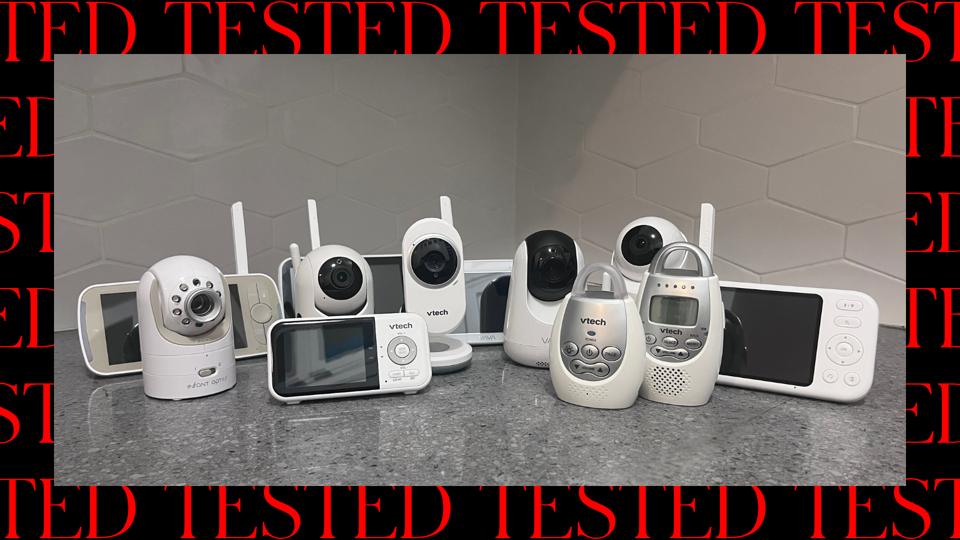
Non-Wi-Fi baby monitors sidestep the hacking and data privacy issues associated with internet-connected models. “A really simple way to limit the information collection and sharing is to have non-connected devices,” says to Caitlin Fennessy, vice president and chief knowledge officer at the International Association of Privacy Professionals. They are also easier to set up because there’s no need to connect your device to a network or pair with an app, but keep in mind that you can’t use them to check on your kids when you’re away from home.

I have tested over 20 baby monitors over the last year—including Wi-Fi models—and I believe the Infant Optics DXR-8 Pro is the best non-Wi-Fi baby monitor, as well as the best baby monitor, full stop. It has an excellent set of useful features without being overly complicated. The camera has the ability to remotely pan and tilt, and there are three lens options to help you get a good view of your baby and the nursery. It also has a night vision mode, so you can still see your baby with the lights out, although that’s something nearly all modern monitors can now do.
Excellent Range
The manufacturer says the DXR-8 Pro has a 1,000-foot range, but these ranges are usually calculated in open spaces. I’ve found that the ability to transmit through floors and walls is the true test of good signal. This one maintained a connection everywhere in my apartment, beyond one floor and from the backyard—unlike many of the monitors that don’t make this list of top picks.
Quiets Background Noise
One feature that stood out when I tested this Infant Optics model is the option to turn on active noise reduction. It was able to dim background noises like sound machines, fans and air purifiers without quieting my child’s sounds. Another mom of three says she appreciates the sound quality of this baby monitor and that the parent unit is actually loud enough to wake her up when a baby is crying, unlike some of the other monitors with noise-reduction features that she tried. With a 5-inch screen and 720p resolution, it doesn’t have sharpest picture on the market, but I’m still satisfied with my ability to see how my child is doing.
There are some reports of problems with the longevity of Infant Optic’s batteries, but I have not encountered this issue after using this monitor for nearly a year. The battery can be purchased separately and replaced if it does give out on you.
Plenty Of Useful Features
This monitor from Hellobaby is less than half the price of my top pick, but it still has a number of my most-used features, including remote pan and zoom, night vision and temperature alerts. It also has two-way talk and can play lullabies, although I’ve found I rarely use those features on any baby monitor. It’s easy to set up and use (the baby camera and monitor unit arrive paired), and it has a 1,000-foot range, according to the manufacturer. The parent unit’s battery life lasted up to eight hours, which also impressed me—because I didn’t need to plug it in for an entire workday and could charge it overnight.
See The Whole Room, But Not The Sharpest Picture
I appreciate that the camera can rotate 355 degrees on its base, letting me see almost every inch of the room it was in. This Hellobaby monitor can accommodate a setup of up to four cameras if you need to monitor multiple babies or different rooms, although I didn’t test this option.
The big downside here is the lower resolution, resulting in lower picture quality, but I can still see enough to know what’s happening. If you want an even more affordable option and are willing to forgo video entirely, you may want to consider my audio-only pick below.
Packable
Truly tiny, this petite baby monitor from VTech is small enough to tuck into a diaper bag or backpack. I like its long range, not only holding a connection between the camera and parent unit throughout our three-bedroom apartment but also when I took it out in the backyard. That’s a big plus for me in a travel monitor, because I enjoy being able to relax on the porch or deck of the vacation rental while also being able to keep an eye on the baby during naptime.
It has an affordable enough price to consider as a secondary monitor, which would save you the time and hassle of taking down and reinstalling whatever setup you have in your nursery at home.
Tiny Trade-Offs
Of course, the small size means a smaller screen. Some caregivers might want a bigger picture and higher resolution—this one is only 270p. There’s also no remote adjustments to the camera, so it’s important to check that you have the right view when you set it up to avoid disturbing a sleeping child later. I also found it to be quieter than bigger options, and in a noisy room, I sometimes worried I wouldn’t hear a baby crying and found myself checking the video more. But overall, these weren’t dealbreakers for me—and you’ll have to determine if they are for your family.
For Two Rooms—Or Two Kids
This split-screen baby monitor was first recommend to me by baby gear expert Kate Montell, A.K.A. . If you have two kids or just want to keep video feeds set up in different rooms, the two-camera option from Vava is a nice choice that lets you see the picture from both cameras at once. Other monitors let you connect more than one camera, but many of them require you to switch back and forth between the different feeds.
Unlike the other two camera setups I tested, both cameras came paired with the parent unit right out of the box, so I was up and running quickly. I found it stayed connected throughout my apartment—but not in the backyard.
Plenty Of Features
In addition to split-screen capability, it also has white noise, a night light, remote camera adjustments, two-way talk and a temperature sensor. I like that it has buttons to use many of the features, rather than burying them in a complicated on-screen menu.
See Clearly, All Around
In a world where our TVs, computers and phones deliver ever-sharper images, it can be jarring that so many baby monitors have a resolution below 1080p. The Jartoo baby monitor, however, has 2K resolution along with a fully articulated (and remotely adjusted) camera, so you can see a sharper image and change the angle with ease. It has two levels of zoom, giving you an even clearer look at details.
I found this monitor has good range all around my apartment, but it lost signal when I went outside of the building. The camera also has plenty of other features, including noise reduction technology that minimizes background sounds, calming sounds and lullabies, a temperature sensor and the ability to set an alarm for the end of naptime or as a reminder for feedings.
But Some Quirks
While myself and another tester found this model to be an all-around good monitor, it has a few funny quirks. For example, the user manual I received didn’t match the actual on-screen menu—there’s no mention of the “ANC” noise-reduction in the manual. This monitor’s visual cry alert is creatively capitalized “ALarm,” the symbol that is supposed to be a baby crying looks more like a paw print when shrunken down, and there are typos here and there. While you don’t usually see this type of thing on high-end monitors, they don’t actually interfere with the monitor’s overall function.
Simple
Many caregivers only need a monitor to tell them one thing: Is my baby crying? If this sounds like you, consider an audio-only monitor. I tried a couple of VTech’s audio baby monitors and found I prefer the DM221 because it’s easy to use and intuitive. It has a small night light, two-way talk, and it lights up when louder sound is detected, so there’s still a visual alert even without a video screen.
Portable
Because the parent unit doesn’t need a screen and has a clip on the back, it’s easy to move it around the house. This, combined with the option to configure it with two parent units, means you have a lot of options to do other things while your baby is napping. Its lower price and compact size makes it another attractive secondary option that you can take with you on trips.
Other Non-Wi-Fi Baby Monitors I Tested
I tested a dozen non-Wi-Fi baby monitors for this guide. Those featured above are my top picks, and these are the additional monitors that I tried.
(4/5 stars): There is a lot to like about this monitor, which was previously among my top picks. However, I found that it lost signal in some parts of my apartment, which is a lot smaller than many American suburban homes. If you have a small place or plan to keep the monitor on the same floor as your baby’s room, this could be an affordable pick for some.
(4/5 stars): I liked this small monitor that’s designed for use in a car. However, child seat safety technicians typically don’t recommend adding any after-market accessories to your seat unless explicitly approved by your car seat manufacturer. Consider checking your car seat manual or reaching out directly to the brand before adding it to your vehicle.
(3.5/5 stars): This monitor is easy to use and has quite a few features, and a previous tester liked it quite a bit when first testing it several years ago. When I retested it over the last year, it lost connection in different parts of my apartment, and with only 720p, the picture wasn’t the best quality.
(3.5/stars): This was a contender for the the best split-screen baby monitor, but the cameras didn’t stay connected to the parent unit everywhere in my apartment. However it did have pretty good picture quality and the controls are intuitive. If you plan on keeping the parent unit within a fairly tight range from the baby’s camera, it could be a lower-cost two-camera option to consider.
(3.5/5 stars): I found that the parent unit of this monitor disconnected from the video around my apartment and that the controls were confusing. Many functions, like camera angle adjustments, are hidden in on-screen menus, rather than controlled by buttons on the parent unit.
(3.8/5 stars): This audio-only monitor is good, but I like it a little less than the similar VTech DM221 model, which I named the best audio-only monitor. There’s a night light, but it turns off automatically after a few minutes, and although the monkey is cute, it falls over easily.
How We Tested Non-Wi-Fi Baby Monitors
To make this list of the best non-Wi-Fi Baby monitors, we conducted deep market research and rigorously tested 12 top models to make our final list.
- We collected insights from parents about what non-Wi-Fi baby monitors they’ve loved, which ones disappointed them and what features they found most helpful.
- The author selected top models and set them up in her three-bedroom apartment. She then evaluated the monitors’ ability to hold a connection between the baby unit and the parent unit in the different rooms. She also took them outside to test their range.
- We evaluated video quality, range length, versatility and any additional functions such as two-way talk, white noise and lullabies. We prioritized monitors that let you remotely pan, tilt and zoom.
- The author used the monitors in her children’s rooms to monitor her infant twins and 4-year-old son as they slept and played.
- We continue to test our winners long-term, as well as evaluate new models.
What To Look For In The Best Non-Wi-Fi Baby Monitors
Here are a few aspects to consider when shopping for a baby monitor that doesn’t connect to the internet.
It Doesn’t Need Wi-Fi
“Understanding whether the device or toys you are looking at are connected to your Wi-Fi and the internet is a critical first step,” says Fennessy.
Typically, it’s not difficult to tell if a baby monitor uses Wi-Fi or not; this aspect of the product is usually advertised in the name or description, as well as on the packaging. But it’s worth noting that some hybrid models give you the option to turn Wi-Fi off, which may be great for parents who want to occasionally use an app for remote monitoring. But if you want to minimize the risks to your family’s privacy, remember that hybrid models leave more room for human error—you may forget to turn off the Wi-Fi, for example, leaving your system unintentionally more exposed to hackers.
Frequency Hopping Spread Spectrum (FHSS)
Instead of getting online to transmit information, most non-Wi-Fi baby monitors have FHSS technology, which works on radio frequencies. “Frequency Hopping” means the devices jump quickly between different frequencies in a set order, making it exceptionally difficult to hack the video feed.
Video Considerations
A baby monitor with 1080p or 2K resolution gives you a much better picture than 720p or 480p. A larger monitor screen may help you get a better view, too. However, many parents find they can still get the most important information (seeing if the baby is awake or not) from monitors with lower picture quality.
Night vision capability is a must-have for baby monitors with video, and is a feature all the recommendations on this list have, except of course my audio-only pick.
Remote Camera Positioning
Unless you plan to mount your camera in a way that gets you a great view of the whole room, remote camera positioning—zoom, tilt and pan—is a really valuable feature. My first baby monitor did not have this capability, and I found I often couldn’t see my son when he moved out of the frame or if the camera got accidentally moved slightly out of place on his dresser.
Range
A longer range means you can monitor your baby from a further distance. Many non-Wi-Fi monitors claim to have ranges of 1,000 feet, but in real life, obstacles like walls can significantly reduce that number. Factors like the thickness and number of your walls between the camera and monitor are surprisingly important. In my testing, the ability to stay connected in different rooms was a major differentiator between the monitors that made this list and those that did not.
Volume And Sensitivity Controls
Nurseries are often filled with white noise thanks to the hum of devices like sound machines, humidifiers, fans and air purifiers. These sounds can keep a baby monitor in high-alert with the screen and sound on, and drain the device’s battery faster. To avoid this issue, the best baby monitors have sensitivity controls, and some even have noise cancellation tech. This can help you set the device to better detect baby fussing and lower the risk of “false alarms” that are caused by an AC turning on or a car driving by outside.
You’ll also want to look for easy access to volume control. Buttons on the exterior of device are easier to deal with than those buried in some kind of on-screen menu.
Extras
Many baby monitors now double as night lights, sound machines, and some can play preset tunes designed to soothe or entertain your child. Some also have two-way talk, which might be helpful if you want to speak to a partner from another room. I’ve personally found these features to be less helpful, but if one is important to you, there are many great monitors that provide these features.
Why Trust Forbes Vetted
The staff who work on the baby and kids gear section of Forbes Vetted have tested hundreds of maternity, baby, nursery and kids items to help our readers make the best buying decisions.
- Margaret Badore is the author of this article and the baby and kids gear editor at Forbes Vetted. She has over 15 years of experience working as a journalist, with a background covering health and science topics. She’s a mom of three kids, ages 4 and under, and recently wrote about the intersection of smart tech and parenting.
- Badore has tested 23 baby monitors over the course of the last year with her three young children, including a dozen non-wi-fi models, using them in her nursery and comparing their performance and features.
- This story was edited by Rose Gordon Sala, a deputy editor at Forbes Vetted, where she oversees the tech and baby and kids gear sections. She’s a mom of three who has plenty of experience with baby monitors herself. By the time she got to her third baby, she opted for the simplicity of the VTech audio monitor featured in this guide.
- We seek expert advice to help inform our product picks. For this story, we interviewed Caitlin Fennessy, VP and chief knowledge officer at the , to learn about how to protect your privacy when using a baby monitor and what to look for when shopping for one. We also spoke with baby gear expert Kate Montell, creator of the concierge baby registry service , about what models are popular and what she recommends.