If you’re looking to add a printer to your home office or business space, odds are you’re considering one of two printer types, a laser versus an inkjet printer. The former, like the affordable , offers plenty of speed; laser printers can often print up to 30 pages per minute. An inkjet printer, such as the multi-functional , are generally more ideal for color documents and photos.
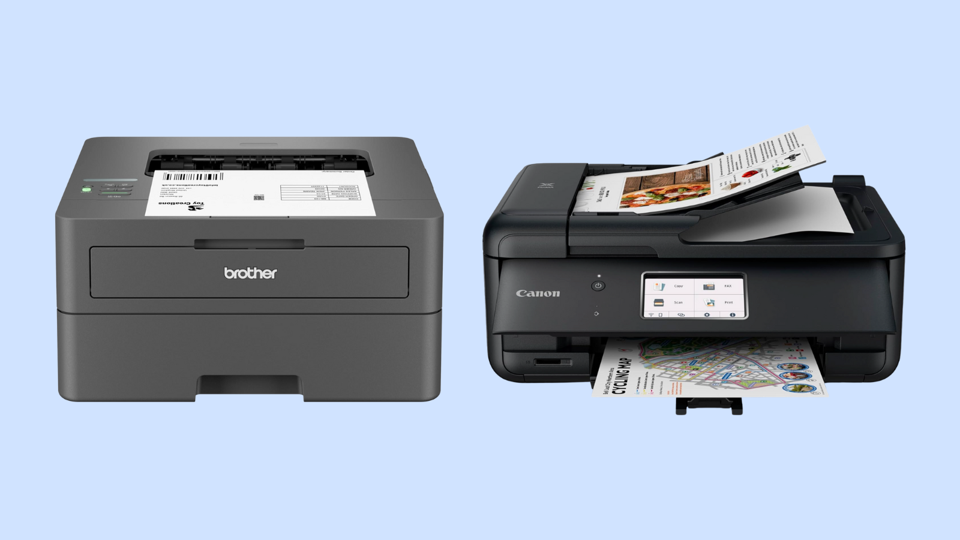
But it’s more than just the kind of document you intend to print. After researching and testing over dozen printers, our tech team found that important features to consider include print speed, image quality, color versus monochrome printing, multi-function capabilities and more. Whether you plan to add a printer to your home office or business, here’s how to decide between an inkjet versus a laser printer.


Laser Vs. Inkjet Printers: Overview
Each Offers A Different Way To Get Ink Onto Paper
Both laser printers and inkjet printers can do a fine job of transferring text and graphics onto paper. Most laser printers are limited to monochrome, or black-and-white, prints, but they tend to be faster than inkjet printers. Inkjet printers can create print shop quality photos and documents, albeit at slower speeds and usually higher ink costs. Here’s how each printer puts ink onto the page:
- Laser printers: These printer types use laser beams to “draw” an image onto a charged drum. The printer pushes out toner particles, which are attracted to wherever the laser beam fell on the drum. As the drum turns, these particles are then rapidly transferred to the paper passing by.
- Inkjet printers: They create images and text by spraying tiny droplets of ink onto paper with crisp precision, thanks to the use of multiple microscopic nozzles. While it’s a slower method, the images are usually crisp and in bright, photorealistic color.
Laser printers tend to be just that, printers, while inkjet printers tend to offer an all-in-one package that can print, copy, scan, fax and more. If you’re not sure which one to get, based on our team’s testing and research, there are four main factors to take into consideration : speed, print quality, price and functions.
Laser Vs. Inkjet Printers: Speed
One Is Decidedly Faster Than The Other
Laser printers are much more efficient than inkjet printers. After researching and testing over a dozen printers to find the best home printers, our team found that laser printers, when printing single-sided monochrome jobs, had an average speed of 30 pages per minute (PPM). Keep in mind that number is based on home office and small business devices; professional-grade laser printers on average between 50 to 100 PPM, and sometimes, that number can go even higher.
Inkjet printers, simply put, can’t achieve similar print speeds, and you should expect them to be slower, according to printing experts. “A laser printer is much faster,” says Robert Covington, senior product manager at Toshiba America Business Solutions, adding, “Even the slowest laser printer is faster than the fastest inkjet printer.”
When printing monochrome documents, our team’s testing found that inkjet printers usually print between five to 10 PPM, with color documents coming out in the three to seven PPM range. Larger inkjet printers can achieve closer to 20 PPM in monochrome and some can approach that in color printouts, but expect to pay more for that premium print speed. If you value speedy print jobs, a laser printer may be best, but if that’s not a dealbreaker, then an inkjet will suit you just fine.
Laser Vs. Inkjet Printers: Print Quality
One Option Showcases Gorgeous, Detailed Prints
No matter what printer you’re using, print quality is almost always quantified in terms of dots per inch, called DPI. A higher DPI count means a sharper, more detailed image on the page because the printer uses more dots of ink in the same amount of space, resulting in crisper shapes and sharper, brighter colors. And if you’re planning on printing lots of pictures at home, sharp and bright are key, and an inkjet printer is a must-have.
Currently, 300 DPI is a common benchmark for what are considered the standard print resolution, though of course an optimal DPI will vary depending on the type of printing project. And, when comparing laser versus inkjet printers, an inkjet generally offers higher DPI counts than laser printers. In short, they’re better for high-quality photo and fine art printing.
The average inkjet DPIs start at around 1,200, though many midrange and premium models offer double that resolution, reaching 4,800 DPI. While laser printer DPIs usually started lower, at around 300 DPI, innovative technologies have seen this DPI increase to 600, and you can find a good selection of options offering 1,200 DPI now.
Still, according to Philip Chu, product manager for UV and specialty devices at printing company Roland DGA, that higher DPI doesn’t necessarily translate to a better picture. “Laser printers are fast and cost-efficient for high-volume text or simple color jobs, but they fall short with photos and detailed color,” says Chu. He adds that inkjet printers, “deliver high-quality images and graphics on a wide range of surfaces, from desktop prints to large-format projects, with special inks, including UV-curable and extra-color options, for bright, more vibrant results.”
If your printing needs are more in the document than picture arena, like lots of handouts for a school, church or charity, then go with a laser printer. If you plan to print family photos and other media documents, opt for an inkjet.
Laser Vs. Inkjet Printers: Price
Consider Your Budget
In terms of upfront costs, an inkjet printer usually costs less than a laser printer. You can often find inkjet printers, like our value home printer pick, the , priced under $200 (and often on sale). It can easily meet the printing needs of most homes or small businesses well.
Laser printers usually cost closer to $200, even for smaller units like the , that are designed for homes or small businesses. If you’re seeking a larger monochrome option, like its sibling, the , you may pay well over $200.
But over time, a laser printer will be the more affordable option. That’s because of the price of toner versus the price of ink cartridges. A laser printer’s toner cartridge often costs between $75 and $100, but one can typically print over four thousand pages before needed replacement, with the average per-page cost as low as two or three cents.
Inkjet printer ink cartridges yield many fewer pages, usually running dry after 200 to 400 pages at most. Some, like the HP Envy 6555e, can only last around 160 monochrome pages before you need a new cartridge. That can translate to a per-page cost as high as 10 to 20 cents, depending on the model you choose.
Again, consider your costs here. If you want cheaper per-page prints, a laser is the best option. However, if you want a more affordable out-of-the-box choice, an inkjet may be better suited to your needs; just keep in mind that you may have to spend more per-page on the long run.
Laser Vs. Inkjet Printers: Functions
One Type Offers More Flexible Printing, Copying And More
You can find both laser printers and inkjet printers that offer multifunction capabilities, with these printers often referred to as all-in-one printers. Typically, if a printer can print multiple media types, scan documents, make copies and also send and receive faxes, it’s referred to as all-in-0ne, or AIO.
At lower price points, it’s more common to find inkjet all-in-one printers than it is to find laser all-in-one printers. If you need the many functions an all-in-one device offers but you don’t see yourself needing a high and fast print volume, an inkjet all-in-one is likely the way to go. An all-in-one inkjet printer is also ideal for those that need colorful prints, too: They can also scan and copy in color.
If you don’t need color printouts but you do need to send, receive, print and copy a lot of monochrome documents, then investing in an all-in-one laser printer is the smarter move.
Inkjet Printers Vs. Laser Printers: Final Thoughts
It’s Largely About Color And Volume
Laser printers mostly print in black-and-white, and if you want a color laser printer, expect a premium price tag. That said, the benefits of laser printers are also clear: They print quickly, and over time, they can save you money because toner is cheaper and lasts significantly longer.
Inkjet printers may print pages more slowly than laser printers, but they can work in full color and with great graphic and photo quality. Their ink costs more than laser printer toner per page, but inkjet printers usually have a lower up front cost than laser printers.
So, think long-term about how much you will likely need to print, if you will need full color printouts or not, and about how you want to balance up front and long-term expenses as you shop for a printer. Additionally, decide whether or not you’ll need the extra functionality that all-in-one printers offer. With careful consideration, answering the laser versus inkjet printer debate for yourself should be clear cut.
Why Trust Forbes Vetted
The tech team at Forbes Vetted has dozens of years of combined experience testing, reviewing and writing about hardware of all types, from desktop computers to smart thermostats to outdoor TVs.
- This article was written by Forbes Vetted staff writer Steven John, who has more than 13 years of experience as a journalist and who focuses on tech and gear coverage for Forbes.
- The article was edited by Rebecca Isaacs, Forbes Vetted’s consumer tech and electronics editor, who has multiple years of extensive experience covering all sorts of different tech products, platforms and services.
- To understand and share more about both printer types, John spoke with several unbiased experts. In particular, John interviewed Phillip Chu, product manager for UV and specialty devices at printer company ; Robert Covington, senior product manager at ; and Aimee Simpson, director of product marketing at .
Frequently Asked Questions (FAQs)