Smart locks let you unlock your door with your phone, fingerprint or a simple code—plus, many can lock themselves behind you for additional peace of mind. To find the best smart locks for all sorts of homes, our team tested more than a dozen options, installing them on our own front doors for weeks of daily use. Our top pick is the because it looks like a standard lock, but hides away myriad smart functions. Another favorite, the , can keep an eye on things for you in real time thanks to its built-in camera.

Why We Named It Best Overall
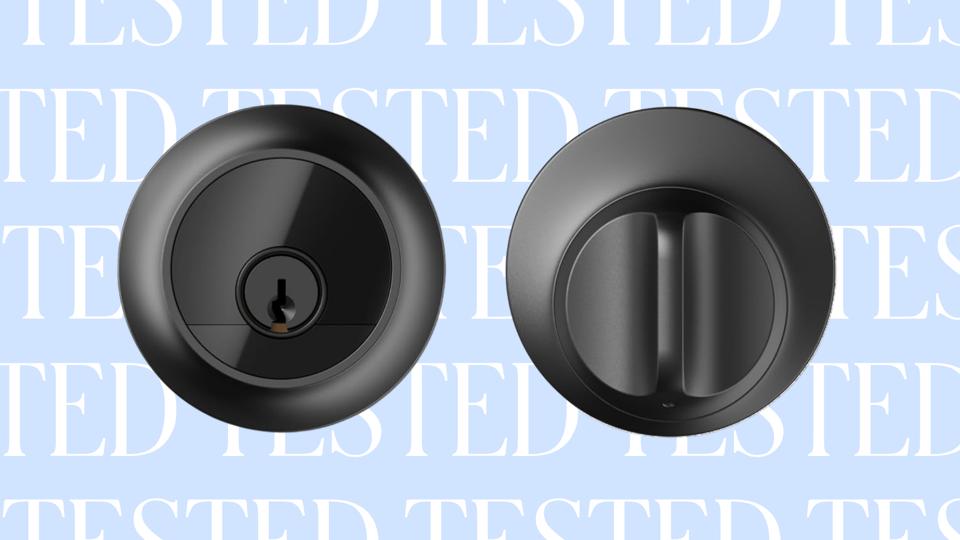
The Level Lock Pro is our top choice because it doesn’t look like a smart lock at all. By hiding the technology inside the deadbolt itself, it looks like a traditional, key-operated lock rather than a bulky piece of plastic. In fact, it’s the most aesthetically pleasing smart lock we tested, making it a stylish option for most homes. Appearances aside, it’s packed with convenient security features: you can unlock it with a classic key, a key fob, a tap of a smartwatch or phone, voice via Google or Alexa, or remotely via app control. It will also notify you when there’s activity at the door and automatically locks itself if you forget.
How It Performed During Testing
Our tester found the lock quick and easy to install, requiring just a Phillips-head screwdriver and tape measure. It “took me about a half-hour for installation and setup,” says our tester. “The instructions, which included a quick-start guide and an app with step-by-step setup, made things manageable.” The only part of the installation process that took some patience was getting the deadbolt properly aligned and calibrating the lock in the app.
Once installed, our tester noted that its clean, modern appearance was a standout. “I’m sometimes wary of products that scream ‘smart home gadget,’ and I think the lower profile makes it look like a premium deadbolt,” he says, adding that all methods of locking and unlocking were responsive during testing. However, it doesn’t come with any biometrics (like a fingerprint reader) or a rechargeable battery, which other smart locks in this guide have. If you can live with those two hang-ups in the name of a smart, effective lock that looks like classic hardware, then this may be the best smart lock you can get.
The 2026 Forbes Vetted Best Product Awards are here: Explore our 150 top-recommended items across categories after extensive research and testing.
Why We Named It Best Value
The Defiant Deadbolt is priced under $100 and comes with all the basic features you need. This includes a large backlit keypad, an event log with access history, the option to add up to ten unique user codes (in addition to one master code), and a Vacation Mode that lets you “turn off” those user codes without deleting them. It works with Home Depot’s Hubspace system, as well as Amazon Alexa and Google Home. However, you need to set up a free account with Hubspace before you can connect it to the other ecosystems.
How It Performed During Testing
Our tester found this lock relatively easy to install, taking about 30 minutes in total—just “attach the front part, attach the backplate and screw in,” he says. Once the lock is installed, it needs to be connected via Bluetooth to the included Hubspace smart plug, which then connects to your home Wi-Fi. This smart plug acts as a hub for the Defiant Deadbolt (they must be placed within 20 feet of one another). Overall, the lock is “more utilitarian than attractive in looks,” says our tester, but this basic appearance makes the keypad more visible and easy to use.
What’s not such a great feature on this affordable smart lock is the noise it makes when locking and unlocking. Our tester called it “loud” with an “audible grinding noise” as it opens. If you can look past that, the Defiant Deadbolt is still a good choice for someone who wants a more basic option that costs less than most other smart locks.
Why We Named It Best Palm Reader
The TCL D1 Pro Palm Vein Smart Lock gives you so many ways to open your door that it’s almost overkill. The easiest method is as simple as a wave: you hold your hand a few inches in front of the lock and the lock identifies you based on your unique hand using palm vein reading technology—and opens on up. The lock can store up to 50 scanned palms in its local memory, no connection to Wi-Fi needed.
How It Performed During Testing
With the help of my tech-savvy tween, I installed our TCL D1 Pro Palm Vein in about 20 to 25 minutes with no real challenges. It fit the existing holes in the door and the jamb just fine, and it was easy to get it secured in place. Programming the code and getting everyone in the family’s palms scanned into the lock was easy too, especially because there are plenty of videos online to follow.
The one drawback I’ve found with this smart lock is within the palm scan. Sometimes I can approach the lock and casually aim my hand at it only to have it open right away, while other times it fails to recognize my palm unless I hold it in a precise position, with the angle, distance and height all just so. I now know where this sweet spot is and can always hit it when I’m being careful, but I wish it had a wider and slightly less finicky scanning window.
Why We Named It Best For Guests And Workers
The Aqara Smart Lock U100 offers the option to create multiple, temporary codes, so you can let in guests or people who will be doing work at the house without granting them repeat access. It also has an auto-lock feature that automatically locks the door if your house guests forget, giving you an extra peace of mind when you’re away from home. Like many other smart locks in this guide, it syncs seamlessly with Apple Home—meaning you can open the lock with your iPhone or Apple Watch—and it has a fingerprint scanner.
How It Performed During Testing
Our tester said the install was simple, and she was able to get it done in about 30 minutes thanks to a QR code that offered a step-by-step video of how to install the lock. She also appreciated how she could provide temporary access guests. “This lock fits great into my daily life,” she says. “I now have this in my Google Home app (so I have a central view of all my devices) to lock and unlock the door while i’m upstairs. When I’m expecting guests over, I can always unlock if I’m not near the door.”
That said, our tester experienced one downside during long-term testing: the fingerprint feature started to lag. “It oftentimes does not read my finger print,” she says. “This could be an isolated problem though. On the flip side, I find the fingerprint feature very useful when it is working well.”
Why We Named It Best Video
The Eufy Video Smart Lock S330 does a lot: It’s a smart lock, 2K video system and smart doorbell. Similar to popular video door bells, like the , this smart lock alerts you when people approach the door. You can also communicate with visitors via two-way talk. As for its locking and unlocking abilities, it can be managed via fingerprint, keypad code, the Eufy app, Google Voice, Alexa or a traditional key—the keyhole is hidden behind the doorbell button.
How It Performed During Testing
Our tester had plenty of praise for the multipurpose Eufy Video Smart Lock, including its auto-locking and other security features like alerting you to when the lock fails to engage. “We got an alert that the lock was jammed,” after it had failed to lock. She also noted you can put the lock on a schedule.
One drawback our tester noted was that you’ll need to purchase an SD card separately to keep any video recordings on file. It’s also one of the most expensive smart locks in our guide, but the only one that is both a video doorbell and smart lock in one.
Why We Named It Best For Homes With Kids
The Yale Assure Lock 2 packs in several features that parents can appreciate, and its easy for children to learn how to unlock and lock—just press the Yale symbol, which lights up the numbers, and enter your code. If you or your kid does forget to lock the door, the Yale Assure Lock has DoorSense technology and Auto-Lock that detects if the door is open and locks it automatically after a set timeframe. In addition to these features, you can give custom codes to baby sitters, tutors or neighbors entering your home. These codes are trackable, and they only work during scheduled hours of your choosing.
How It Performed During Testing
Our tester found the hidden keypad the easiest to use with her busy family that includes three kids. “The keypad is intuitive, responsive and easy to use. My 6-year-old memorized our six-digit code in less than a minute and was opening the door right away,” she explained. The auto-lock feature also came in extra handy when forgetful kids left the house or just on a routine busy morning.
It does take four AA batteries, but comes with just one back-up key. Our tester preferred the physical batteries that can be quickly replaced versus waiting for a rechargeable battery to be ready, which has been an issue with her existing video doorbell. It can also be somewhat noisy if your door and lock aren’t quite aligned, our tester also noted.
Why We Named It Best Remote
If you need to control your front door from afar, our team recommends the Schlage Encode Plus Deadbolt. Thanks to its built-in Wi-Fi compatibility, you can monitor your home from anywhere without the need for a separate hub. Like many other smart locks in this guide, it can unlock via your phone app, and on those occasions when you don’t have a phone in your hand, you can quickly punch in a code on the keypad. If you’re an avid Alexa or Google Assistant user, you will also appreciate how responsive the lock is to voice commands.
How It Performed During Testing
I installed a Schlage Encode Plus Deadbolt at my home in less than 20 minutes and with just a cursory glance at the instructions—the process was remarkably quick and easy, which was the first thing I liked about this lock. The second thing was the way the lock informed me of its status anywhere I had an internet connection or cell service. Even when I was on an overseas trip, I would get notices from the Schlage Encode Plus telling me when it had been locked or unlocked.
That said, keep in mind that those notifications can sometimes be delayed. For example, I’d sometimes get a notification that the door was suddenly locked, leaving me feeling uneasy as no one had recently touched the door or the lock—and I had assumed it was already locked. More often than not, though, the lock worked well, and I liked how I could lock the door with the press of a single button.
Why We Named It Best Multiple Access
If you always find that you have your hands full, you might prefer the Lockly Visage Zeno Series Smart Lock, which offers all the typical ways to unlock your smart lock, along with one more: facial recognition. Yes, the Lockly unlocks via fingerprint, keypad, app, voice commands and key but can also recognize people even in their sunglasses. However, the brand says that its facial recognition may not work well with people under age 13, which is why we recommend the for homes with kids.
How It Performed During Testing
Our tester says the Lockly smart lock was “fairly straightforward and easier than I thought it would be to install,” adding that “the trickiest part was taking off our old smart lock… We just used the paper instructions, which were easy to follow.” The only tools you’ll need are a Phillips and a flathead screwdriver.
There is one other feature that many might love, while others find it annoying: “The lock will beep at you continuously if you leave the door not fully closed, which is good for safety, but can be annoying if someone just ran out to grab something from the car, for instance.”
Other Smart Locks We Tested
- (Forbes Vetted score: 4 out of 5): Our tester appreciated that this lock has a “small but bright screen” that can display the steps for adding or changing codes, making its control easy even for “novice users.” He also highlighted its easy installation and that it readily fit into a standard lock space. The lack of internet connection was an issue, though, as that means no remote controlling of the lock and no connectivity with voice assistants. On the plus side, it’s a very well-priced smart lock.
- (Forbes Vetted score: 4 out of 5): This unique smart lock uses your existing lock and you can keep your old keys. It attaches only on the inside of the door and twists the deadbolt when you use an app or a voice command. It’s a low-profile option that’s great for renters who want a keyless entry option but can’t remove an entire lock.
- (Forbes Vetted score: 3.5 out of 5): The Lockly Secure Pro is a large lock that might be too prominent for some people, but it’s also quite a secure device. The keypad is bright and clear and has PIN genie technology that makes digits appear in random spots. The installation can be frustrating, but the lock can be operated in myriad ways and responds reliably to all different approaches to operation.
- (Forbes Vetted score: 4 out of 5): This is another option that’s great for renters. “It uses a retrofit design that’s rather odd, but it works. [The lock] fits onto the back of the door, over the thumb turn or handle. An adapter fits over the turn and, when activated, turns it.” It can connect to a device via Bluetooth, and if you add an optional hub, it works with Alexa, Google, Apple Home and so on.
How We Tested The Best Smart Locks
We tested the best smart locks by using them in real homes and situations with a critical eye toward assessing how well each performed.
Process
- Initial research: We read scores of reviews about the latest smart locks before selecting the contenders for our testing process. We made sure our initial list included models at different prices and with a variety of functions.
- Hands-on testing: Our team installed each contender on their own front doors, locking and unlocking them over the course of several weeks.
- Long-term considerations: Several of the smart locks in this guide have been tested for nearly a year. During that time, we noted if there were any recurring issues, such as a lag with facial recognition, for example.
Criteria
- Installation: We timed each installation and noted if there were any pain points along the way. We also record the ease of initial set up, including entering in pass codes, getting fingerprints scanned and getting apps connected.
- Locking and unlocking: Once each smart lock was installed, we put it through the paces by having multiple people operate the lock via face, fingertip, phone app and more. We also created conditions where we could test every functionality of the lock, including creating one-time codes and opening the door remotely via voice or app.
- Security features: We recorded the security features available on each smart lock, taking note on the responsiveness of notifications or delays when unlocking or locking the door.
How To Choose The Best Smart Lock For Your Home
There’s no shortage of impressive smart locks available for your home. To select the right one for you, our team recommends keeping these three factors in consideration.
Opening Options
The ability to open a lock in myriad ways is about much more than mere convenience—it can be a genuine matter of safety. You can’t be locked out of your home because of a lost key when you can also open the lock via app, key code or a scan of your hand or face. Consider whether you would benefit from remote operation capabilities, temporary codes, body scan tech and more.
Battery Life
Some of the smart locks on our list use rechargeable batteries, which may take a little bit to recharge, while others use a battery you should plan to swap out every so often. In general, look for a battery life of at least six months, but ideally 12 months.
Smart Home Integration
Many users will enjoy the ability to say “Alexa, unlock the door,” but a smart home-integrated smart lock may or may not have access to your favorite smart home system. Before you add a smart lock to your cart, make sure it is compatible with whatever smart home system you use, be it Alexa, Google, Matter or another preferred option.
Why Trust Forbes Vetted
Our team has over a decade of combined experience testing and reviewing products. As a result, we’ve built a vast library of tech and electronic guide, which covers a plethora of smart home devices, such as the best smart locks and home security cameras.
- This article was written by Steven John, a Forbes Vetted staff writer who regularly reviews and tests both tech and gear products, from coolers to iPads. John personally installed and tested two smart locks that are covered in this story.
- The tech stories at Forbes Vetted are assigned and overseen by editor consumer technology editor Rebecca Isaacs, who has years of experience with hands-on testing and reviewing of various products, from TVs to smart rings.
- We regularly review our articles to reconsider the picks when, for example, new or updated products are released. This article was updated in May 2026 to add the and to our list of winners.
Our Experts
- , a PhD researcher at the University of Hertfordshire who holds a Masters degree in Cybersecurity
- Alex Shatwell, a product specialist and commercial manager at